FlashORM Studio
FlashORM Studio is a powerful web-based interface for viewing, editing, and managing your database. Similar to Prisma Studio, it provides an intuitive GUI for database operations without writing SQL.
Studio Variants
FlashORM provides specialized studio interfaces for different database types:
| Studio | Database Types | ORM Support | Documentation |
|---|---|---|---|
| SQL Studio | PostgreSQL, MySQL, SQLite, ScyllaDB, ClickHouse | Full (migrations, code gen, seeding) | This page |
| MongoDB Studio | MongoDB | Visual management only | MongoDB Studio Guide |
| Redis Studio | Redis | Visual management only | Redis Studio Guide |
TIP
SQL databases (PostgreSQL, MySQL, SQLite, ScyllaDB / Cassandra, ClickHouse) have full ORM support including migrations, type-safe code generation, and database seeding.
MongoDB and Redis Studios are visual management tools for browsing and editing data, but do not include ORM features like migrations or code generation.
# SQL Studio (default) - loads from flash.toml
flash studio

# Auto-detect from URL protocol
flash studio "postgres://localhost:5432/mydb"
flash studio "mysql://localhost:3306/mydb"
flash studio "sqlite:///path/to/db.sqlite"
flash studio "scylla://localhost:9042/keyspace"
flash studio "clickhouse://localhost:9000"

# MongoDB Studio - auto-detected from mongodb:// URL
flash studio "mongodb://localhost:27017/mydb"

# Redis Studio - auto-detected from redis:// URL
flash studio "redis://localhost:6379"
Table of Contents
- Overview
- Getting Started
- Database Browser
- Data Editor
- Query Runner
- Schema Visualizer
- Migration Management
- Branch Management
- Security & Permissions
- Advanced Features
Overview
What is FlashORM Studio?
FlashORM Studio is a visual database management interface that provides:
- Data Browser: View and edit table data with filtering and sorting
- Schema Editor: Visual schema management and relationship viewing
- Query Runner: Execute SQL queries with syntax highlighting
- Migration Creator: Generate migrations from visual changes
- Branch Manager: Handle database branching and merging
- Export Tools: Export data in multiple formats
Key Features
- 🚀 Fast & Lightweight: Built with Go and modern web technologies
- 🔒 Secure: Runs locally, no data sent to external servers
- 🎨 Modern UI: Clean, intuitive interface with dark/light themes
- 📱 Responsive: Works on desktop and mobile devices
- 🔄 Real-time: Changes reflect immediately in the database
- 🌳 Branch Aware: Full support for database branching
Getting Started
Launching Studio
# Launch with current database (from config)
flash studio

# Launch with specific database URL
flash studio "scylla://localhost:9042/keyspace"
flash studio "clickhouse://localhost:9000"
flash studio "postgres://user:pass@localhost:5432/mydb"

# Launch with custom port
flash studio --port 3001

# Launch without opening browser
flash studio --no-browser
First Time Setup
Start FlashORM Studio:
bashflash studioOpen in Browser: Automatically opens at
http://localhost:3000Connect to Database: Studio auto-detects your database from
flash.tomlStart Exploring: Browse tables, view data, run queries
Database Browser
Table Overview
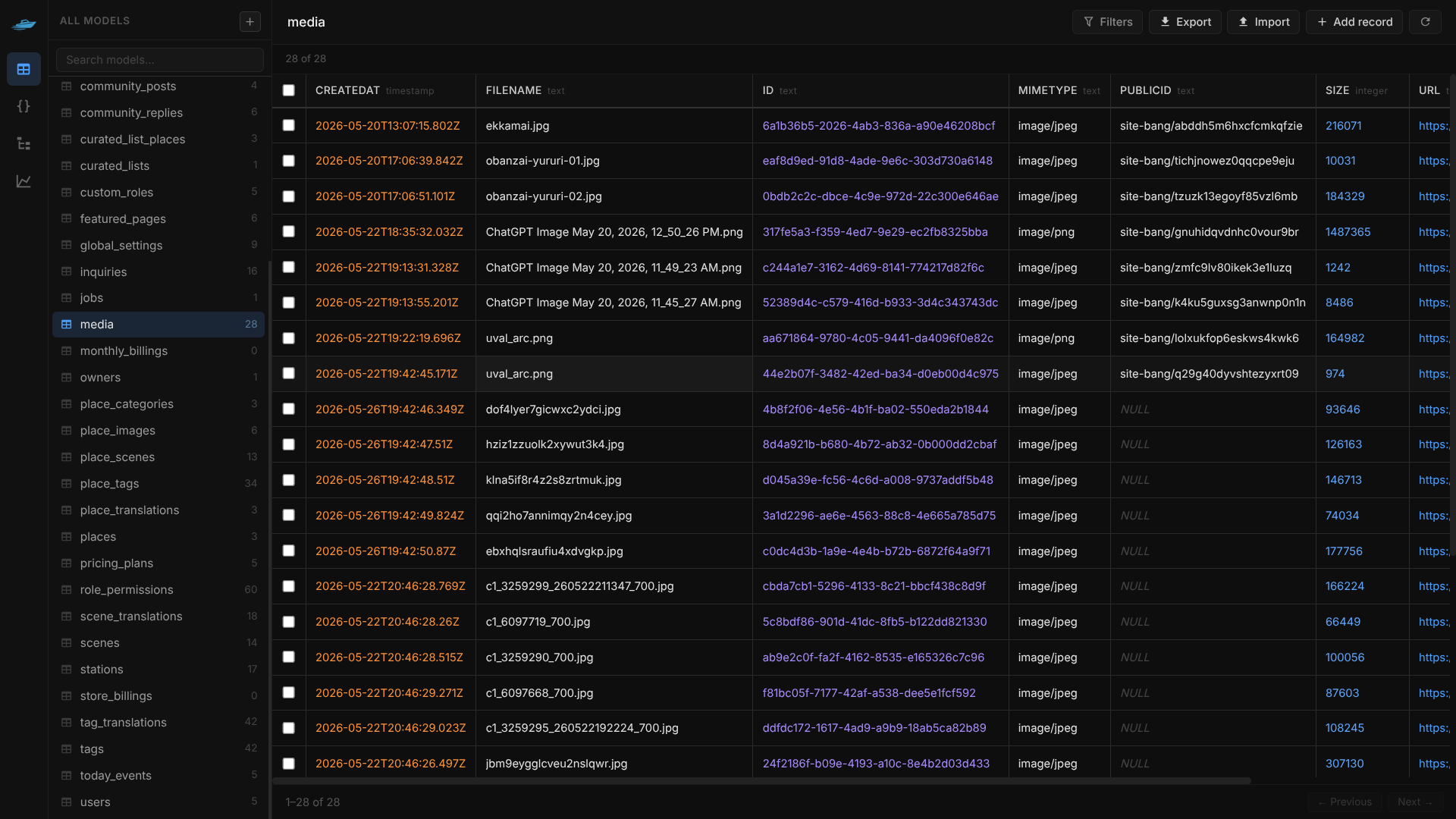
The main dashboard shows all tables with key information:
- Row Count: Number of records in each table
- Columns: Column names and types
- Indexes: Defined indexes
- Relationships: Foreign key relationships
Table Details View
Click on any table to see:
- Data Preview: First 100 rows with pagination
- Column Details: Types, constraints, defaults
- Index Information: Index names, columns, uniqueness
- Foreign Keys: Referenced tables and actions
Filtering & Sorting
- Quick Filters: Filter by column values
- Advanced Filters: Complex WHERE clauses
- Sorting: Click column headers to sort
- Pagination: Navigate through large datasets
Data Editor
Inline Editing
- Click to Edit: Click any cell to edit values
- Auto-save: Changes save automatically
- Validation: Real-time validation of data types
- Undo/Redo: Revert changes before saving
Bulk Operations
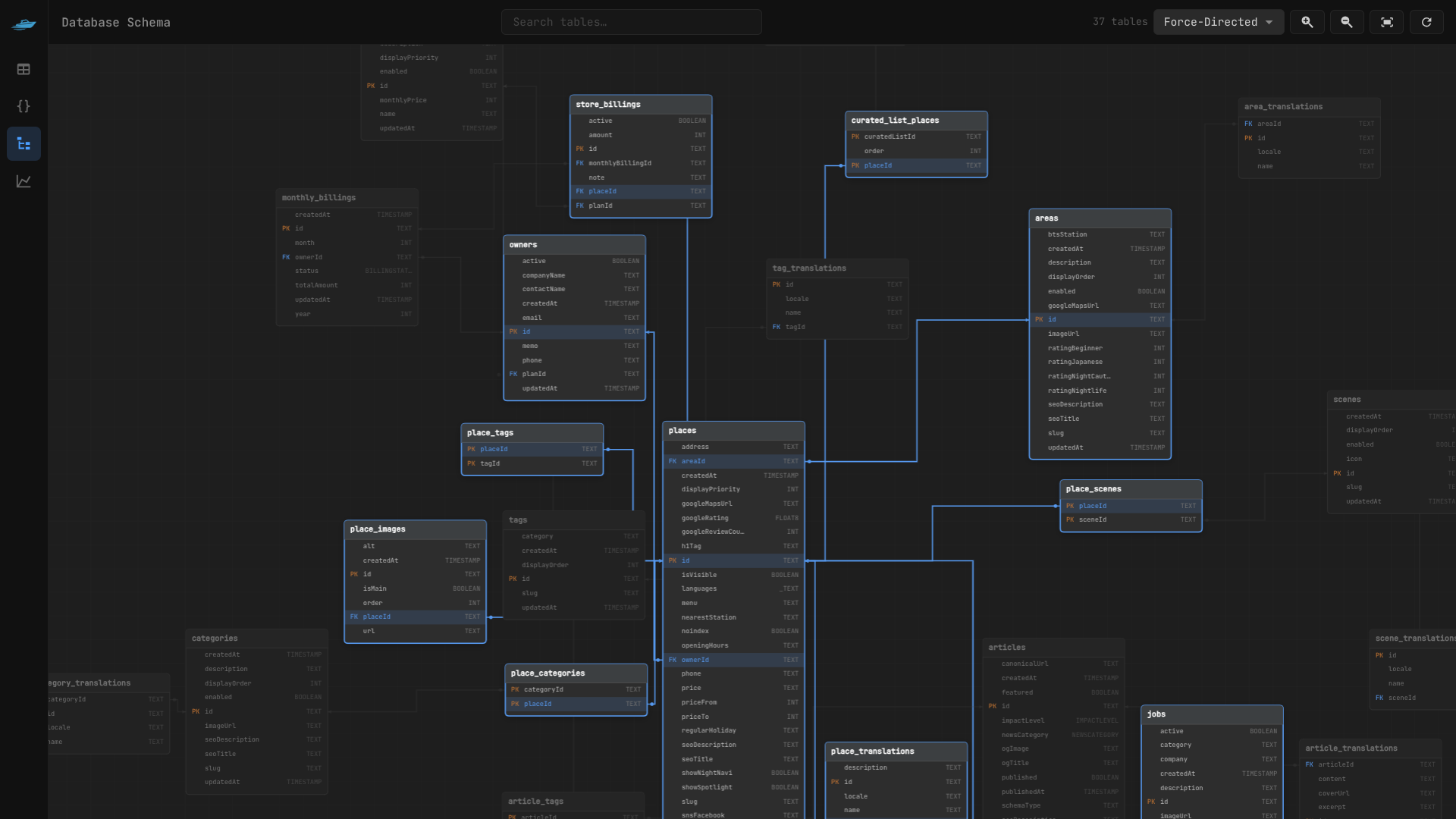
- Select Multiple Rows: Checkbox selection
- Bulk Edit: Update multiple records at once
- Bulk Delete: Delete selected records
- Export Selected: Export selected data
Adding Records
- New Record Button: Add new rows easily
- Auto-increment: Handles SERIAL/AUTO_INCREMENT fields
- Default Values: Respects column defaults
- Required Fields: Highlights mandatory fields
Data Types Support
Studio handles all database types:
- Text: VARCHAR, TEXT, CHAR
- Numbers: INTEGER, BIGINT, DECIMAL, FLOAT
- Booleans: TRUE/FALSE values
- Dates: TIMESTAMP, DATE, TIME with pickers
- JSON: JSON/JSONB with syntax highlighting
- Arrays: PostgreSQL arrays
- Binary: BLOB/BYTEA data
Query Runner
SQL Editor
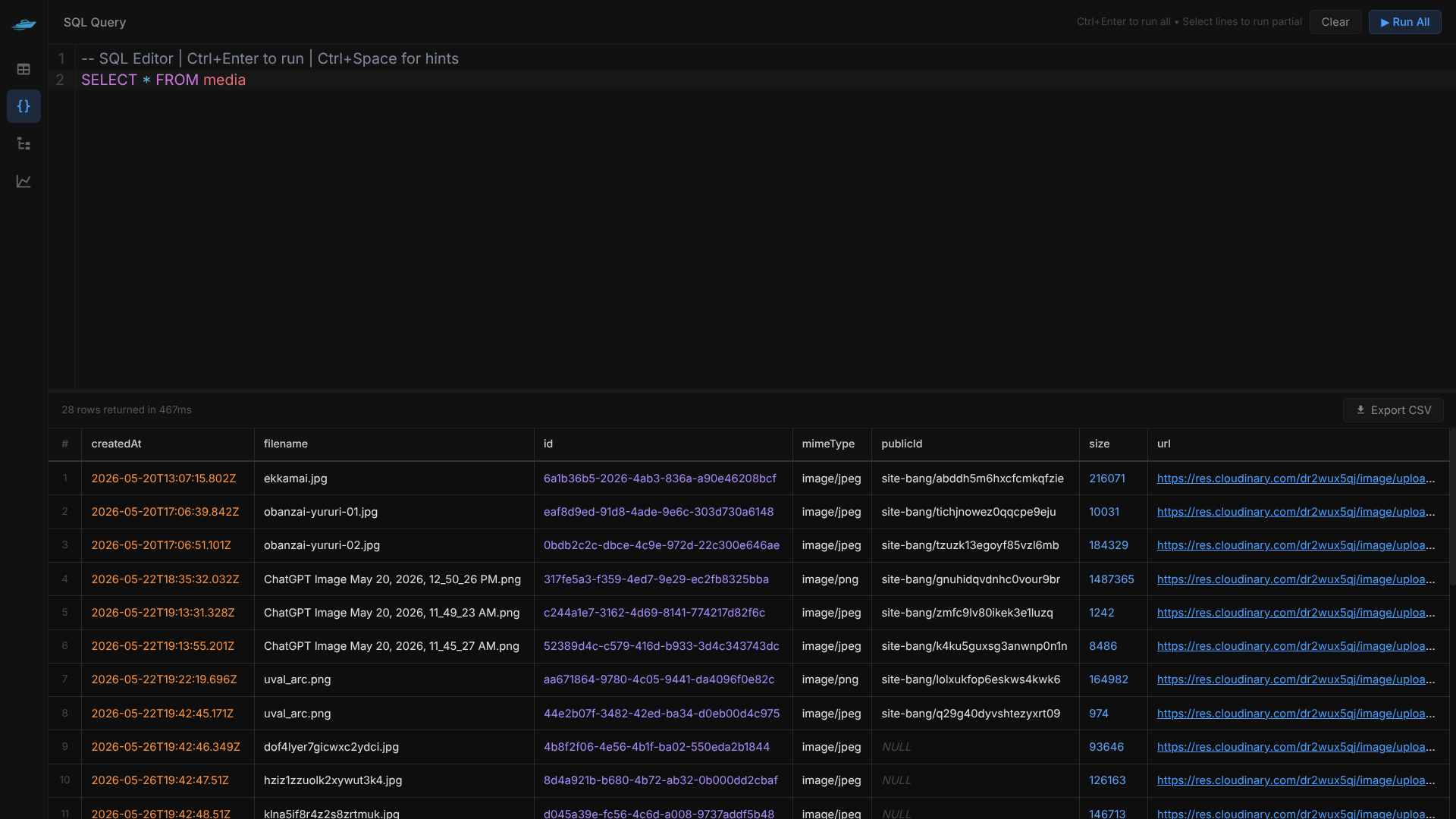
- Syntax Highlighting: Full SQL syntax support
- Auto-completion: Table and column name suggestions
- Query History: Save and reuse previous queries
- Multiple Tabs: Work with multiple queries simultaneously
Query Execution
- Execute Selection: Run selected SQL only
- Execute All: Run entire query
- Explain Plan: Show query execution plan
- Timing: Display query execution time
Results Viewer
- Table View: Tabular results with sorting
- JSON View: Raw JSON output
- Chart View: Visualize numeric data
- Export Results: Download as CSV, JSON, or SQL
Saved Queries
- Query Library: Save frequently used queries
- Tags & Categories: Organize queries by purpose
- Sharing: Share queries with team members
- Templates: Pre-built query templates
Schema Visualizer
Entity-Relationship Diagram
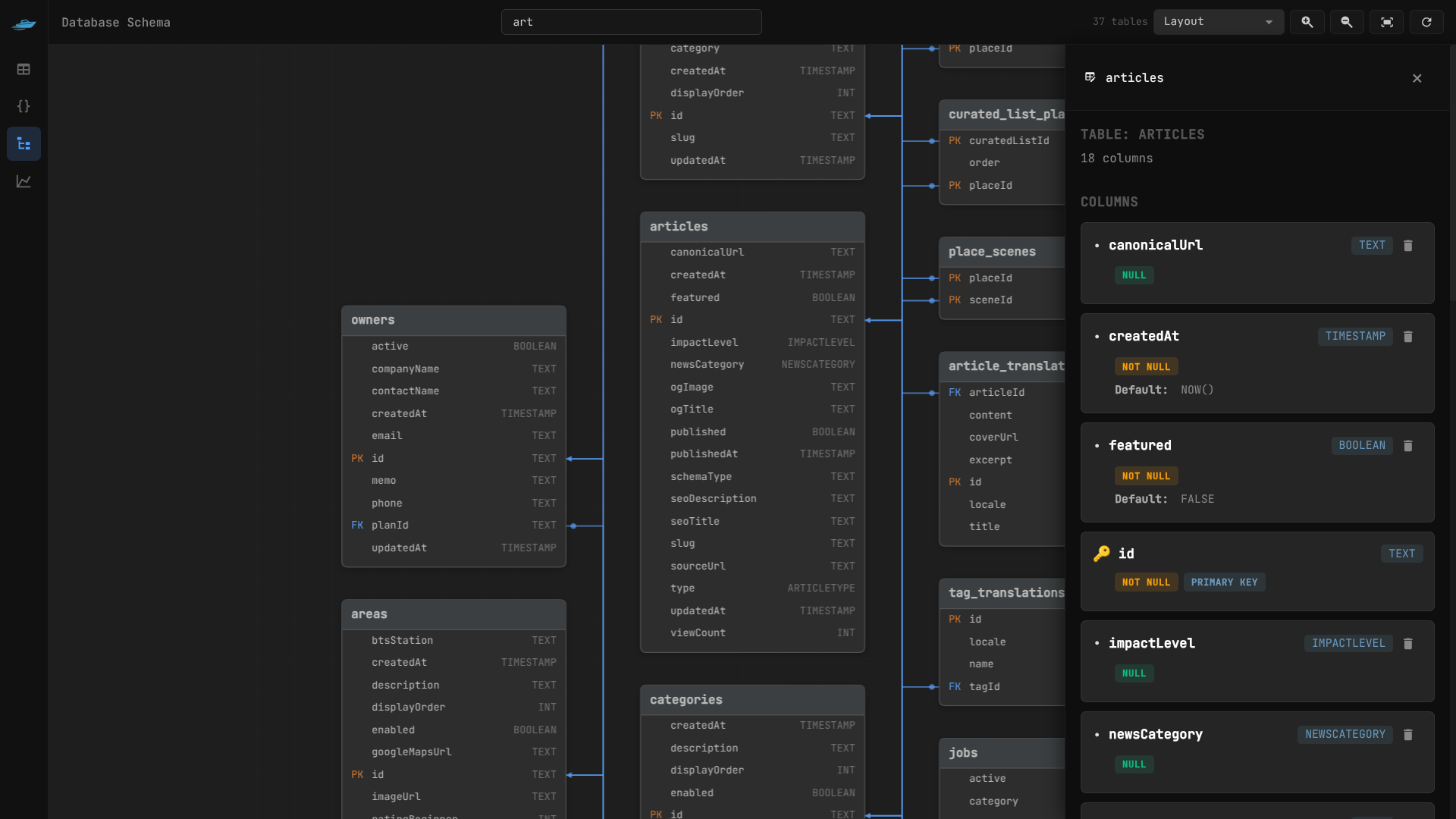
- Auto-generated ERD: Visual representation of your schema
- Interactive: Click tables to see details
- Zoom & Pan: Navigate large schemas
- Export: Save diagrams as images
Table Inspector
- Column Details: Types, constraints, defaults
- Relationships: Foreign keys and references
- Dependencies: Which tables reference this table
- Statistics: Row counts, sizes, indexes
Schema Comparison
- Compare Schemas: Diff between branches or environments
- Visual Diff: See what changed between versions
- Migration Preview: See what migrations would be generated
Migration Management
Visual Migration Creator
- Schema Changes: Modify tables visually
- Generate Migrations: Auto-create migration files
- Preview SQL: See the generated migration SQL
- Apply Immediately: Apply changes directly to database
Migration History
- Applied Migrations: See all executed migrations
- Rollback Support: Rollback to previous states
- Migration Details: View migration SQL and checksums
- Conflict Resolution: Handle migration conflicts
Migration Templates
- Common Patterns: Pre-built migration templates
- Custom Templates: Save your own templates
- Bulk Operations: Apply patterns to multiple tables
Branch Management
Database Branching
Since Flash ORM supports Git-like branching for databases:
- Create Branches: Branch your database schema
- Switch Branches: Change between database branches
- Merge Branches: Merge schema changes
- Resolve Conflicts: Handle merge conflicts visually
Branch Visualization
- Branch Tree: See branch relationships
- Schema Diff: Compare schemas between branches
- Migration Flow: See how migrations flow between branches
Security & Permissions
Local Security
- No External Connections: Studio runs entirely locally by default
- No Data Transmission: Your data never leaves your machine
- Loopback-only by default: Binds to
127.0.0.1unless--hostis specified
Authentication
Studio supports Bearer token authentication via the --auth-token flag.
# Local-only (no auth needed — default)
flash studio

# Network-accessible — auth token required
flash studio --host 0.0.0.0 --auth-token mysecrettoken
When a token is set, every request must include it:
curl -H "Authorization: Bearer mysecrettoken" http://HOST:5555/api/tablesWARNING
Binding to 0.0.0.0 without --auth-token is refused at startup. This prevents accidentally exposing an unauthenticated Studio on a shared network.
CORS
Cross-origin requests are restricted to localhost and 127.0.0.1 origins only. Requests from external origins are blocked.
Request Size Limit
Request bodies are capped at 10 MB to prevent memory exhaustion from oversized payloads.
Input Validation
All table and column names are validated before use in queries. Names must match [a-zA-Z_][a-zA-Z0-9_]* and cannot exceed 128 characters.
Error Sanitization
Raw database errors are never sent to the client. Internal errors are logged server-side and a generic message is returned:
| Error type | Client response |
|---|---|
| Connection / connect | "database connection error" |
| Timeout | "request timed out" |
| Permission / access denied | "permission denied" |
| Everything else | "internal error" |
Access Control
- Database Permissions: Respects database user permissions
- Parameterized Queries: All data operations use parameterized queries — SQL injection is not possible through the Studio API
- Adapter-aware quoting: Identifiers are quoted correctly per database (
"name"for PostgreSQL/SQLite,`name`for MySQL)
Advanced Features
Plugins & Extensions
Studio supports plugins for extended functionality:
- Custom Themes: Create your own UI themes
- Data Visualizations: Advanced charting and reporting
- Import Tools: Import data from various formats
- Backup Tools: Automated backup scheduling
API Integration
Studio provides a REST API for automation:
# Get all tables (no auth)
curl http://localhost:5555/api/tables

# Get table data
curl http://localhost:5555/api/tables/users

# Execute SQL query
curl -X POST http://localhost:5555/api/sql \
  -H "Content-Type: application/json" \
  -d '{"query": "SELECT * FROM users LIMIT 10"}'

# With auth token
curl -H "Authorization: Bearer mysecrettoken" http://localhost:5555/api/tables
Keyboard Shortcuts
- Ctrl+Enter: Execute query
- Ctrl+S: Save current query
- Ctrl+N: New query tab
- F11: Toggle fullscreen
- Ctrl+Shift+F: Format SQL
Themes & Customization
- Light/Dark Themes: Built-in theme support
- Custom CSS: Extend with your own styles
- Layout Options: Customize panel layouts
- Font Settings: Choose your preferred coding font
Use Cases
Development Workflow
- Schema Design: Use Studio to design and iterate on schemas
- Data Seeding: Populate development data visually
- Testing: Verify queries and data integrity
- Debugging: Inspect data during development
Database Administration
- Data Inspection: Browse and understand data structures
- Performance Analysis: Identify slow queries and missing indexes
- Data Cleaning: Fix data quality issues
- Backup Verification: Ensure backups are working
Team Collaboration
- Shared Queries: Share common queries with team
- Schema Documentation: Visual schema documentation
- Data Examples: Provide sample data for documentation
- Migration Reviews: Review migration changes visually
Troubleshooting
Common Issues
Studio won't start
# Check if port is available
lsof -i :3000

# Try different port
flash studio --port 3001
Database connection fails
# Verify database URL
flash status

# Check database server
pg_isready -h localhost -p 5432
Slow performance
- Enable query logging to identify slow queries
- Add appropriate indexes
- Consider pagination for large tables
Memory usage
- Studio caches query results
- Clear cache periodically
- Use pagination for large datasets
Performance Tips
Optimization Strategies
- Indexing: Ensure proper indexes for frequently queried columns
- Pagination: Use pagination for large result sets
- Query Optimization: Write efficient SQL queries
- Connection Pooling: Configure appropriate connection limits
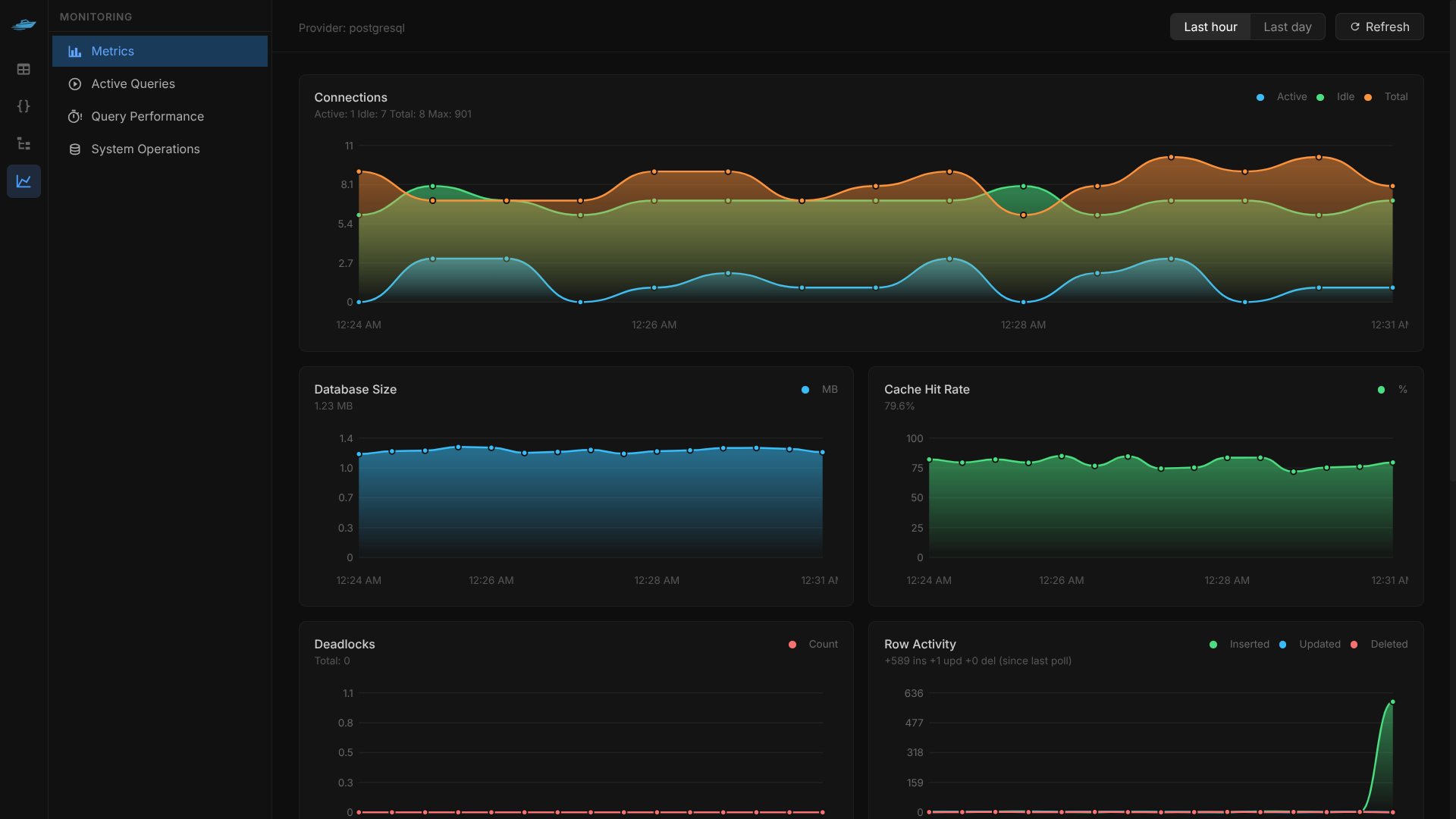
Monitoring
Studio provides built-in monitoring:
- Query Performance: Track slow queries
- Memory Usage: Monitor resource consumption
- Connection Stats: Database connection information
- Cache Hit Rates: Query cache effectiveness
Integration Examples
Development Workflow
# Start development database
docker run -d --name postgres -p 5432:5432 postgres:13

# Initialize Flash ORM
flash init --postgresql

# Launch Studio
flash studio

# Make schema changes visually
# Generate migrations
flash migrate "update schema"

# Apply changes
flash apply
CI/CD Integration
# .github/workflows/deploy.yml
name: Deploy
on: [push]

jobs:
  deploy:
    runs-on: ubuntu-latest
    steps:
      - uses: actions/checkout@v2
      - name: Setup Database
        run: |
          flash apply
      - name: Generate Code
        run: |
          flash gen
      - name: Deploy Application
        run: |
          # Your deployment steps
FlashORM Studio transforms database management from a command-line chore into a visual, intuitive experience. Whether you're a developer iterating on schemas or a DBA managing production databases, Studio provides the tools you need to work efficiently and safely.